If you are currently running a pre December 2011 CU farm and have set up custom search center be careful before installing it. It seems like the maximum number of filters per refiner limits have been set to 250. We were previously using a value of 255 for a refiner. Thus installing the CU (SPF, SPF) broke our search center page with the following error:
Internal server error exception: System.ArgumentException: Max number of filters has to be between 0 and 250 at Microsoft.Office.Server.Search.WebControls.FilterCategory.set_MaxNumberOfFilters(Int32 value)
After discovering the issue we changed to value to 0 (display all the filters according to MSDN http://msdn.microsoft.com/en-us/library/ff625183.aspx, thank you Wesley for the suggestion by the way :) )
<WpNs0:UbiRefineMentWebPart FilterCategoriesDefinition
MaxNumberOfFilters="255"
to
<WpNs0:UbiRefineMentWebPart FilterCategoriesDefinition
MaxNumberOfFilters="0"
And problem solved.
More complete log below for searching purpose :
03/20/2012 16:16:07.85 w3wp.exe (0x1578) 0x1724 SharePoint Server Search Query dn1p Medium Filter category FASTMaxNumberOfFilters in the config is in wrong format.Input string was not in a correct format.
03/20/2012 16:16:07.85 w3wp.exe (0x1578) 0x1724 SharePoint Server Search Query g1j9 Exception Internal server error exception: System.ArgumentException: Max number of filters has to be between 0 and 250 at Microsoft.Office.Server.Search.WebControls.FilterCategory.set_MaxNumberOfFilters(Int32 value) at Microsoft.Office.Server.Search.WebControls.RefinementManager.ConfigureCategories() at Microsoft.Office.Server.Search.WebControls.RefinementManager.Initialize(Location location) at Microsoft.Office.Server.Search.WebControls.CoreResultsDatasourceView.CreateLocationList() at Microsoft.Office.Server.Search.WebControls.CoreResultsDatasourceView.SetPropertiesOnQdra() at Microsoft.Office.Server.Search.WebControls.SearchResultsBaseWebPart.EnsureWebpartReady() System.ArgumentException: Max number of filters has to be between 0 and 250 at Microsoft.Office.Server.Search.WebControls.FilterCategory.set_MaxNumberOfFilters(Int32 value) at Microsoft.Office.Server.Search.WebControls.RefinementManager.ConfigureCategories() at Microsoft.Office.Server.Search.WebControls.RefinementManager.Initialize(Location location) at Microsoft.Office.Server.Search.WebControls.CoreResultsDatasourceView.CreateLocationList() at Microsoft.Office.Server.Search.WebControls.CoreResultsDatasourceView.SetPropertiesOnQdra() at Microsoft.Office.Server.Search.WebControls.SearchResultsBaseWebPart.EnsureWebpartReady()



 Recently I was asked to add some element in the ribbon upper part just before the Site Actions Menu. Thus I needed to increase the height of the upper part of the ribbon to fit our content (blue part in the screenshot above).
 As you probably all know, SharePoint 2010 allows site administrators to change the sites logos just like 2007 did. This is done on the “Title, description, and icon” page


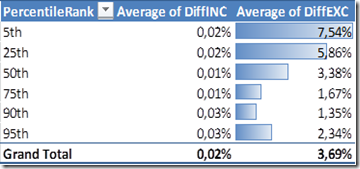
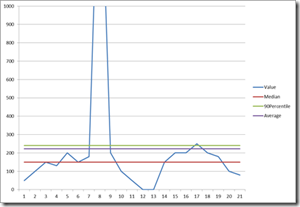 Ok, so why it is useful you might ask, well it is common to analyze your data series without the extreme values that might indicate problem with your data source. An example is in the software performance testing field where you will usually consider the 90th or 95th values of the response time in order to know what the reasonable highest response time is without considering test aberrations or errors.