Sunday, April 05, 2009

Thinking of copying a locked SharePoint site collection ? Think twice !

clip_image002[7]I recently had to copy a locked SharePoint site collection from one farm to another farm. I soon realized this wasn’t such a great idea especially if the farms aren’t in the same AD domain. Here is a quick recap of what I noticed after a few more investigatory steps.

Eager readers will eagerly jump to the final conclusion.

Copying though stsadm backup/restore

Let’s try copying this site collection with the stsadm backup and restore commands. Both farms are MOSS RTM farms.

The backup worked smoothly. The restore is a total disaster (“Additions to this Web site have been blocked. Please contact the administrator to resolve this problem.”) :

screenshot.1

The weirder part is that the collection is visible in the central administration but it seems totally messed up. No way to delete it from the Central Adminsitration. The stsadm deletesite command returns the “Additions to this Web site have been blocked. Please contact the administrator to resolve this problem.” error.

Conclusion : Not a good idea ! Might actually works using the trick I finally used, see below.

Copying using a SQL Server backup

Seemed like today would be another day battling with SharePoint. But I wasn't short on idea. Indeed My locked site collection was alone in its content DB, therefore I was able to use a backup to restore the collection on my target farm.

The restore wentsmoothly. I was starting to believe it was actually going to be easy!

And then my frail hopes were cruelly shattered by the terrible SharePoint truth when I opened up the Central Administration to change the collection administrator.

The first obvious step is to select the site collection but when selecting the site collection in the “Select Site Collection” popup, none of the collection details would appear on the right.

clip_image004

Huh ? I tried validating the popup anyway and was presented with this screen:

clip_image006

It seemed just as if I had selected nothing, yet the adress bar contained the id of the content database :

clip_image008

Trying to unlock this site collection would produce kind of the same result.

I then realized that the farm administrator had no right on the collection. He indeed had no permissions on the collection when it was backuped. Lucky me, the farms were part of the same domain, therefore I tried a quick and dirty fix, I added the original farm administrator to the target farm administrator group and logged in the Central Adminsitration with this administrator.

It was a relief to be able to see the details of the collection. Thou shan’t prevail over me SharePoint !

But once again, I underestimated my adversary which quickly retaliated with a now too common “Additions to this Web site have been blocked” when I tried changing the collection administrator.

clip_image010

But victory was mine at long last when I unlocked the collection while logged in with the original farm administrator account on the target farm. After this step I was able to change the collection administrator to the target farm administrator as I intended from the beginning.

Conclusion : It works, but both farms have to be in the same AD domain

Final Conclusion

If possible I would advise you to unlock the site collection before proceeding with the copy. If it isn’t possible, I hope both of your farms are part of the same AD domain, otherwise good luck! Please keep me posted if the powers that be are you on your side.

By the way, for those of you thinking that I should have tried the stsadm export command, one simply can’t export a locked site collection this way.

Monday, March 23, 2009

IIS 5 and 6 time-taken field

IIS_time_takenWhile checking the performance problem a client was having with a legacy ASP.NET 1.1 application (yep, I am still young enough to call a 6 years old system, legacy J ), I asked myself what seems like a basic question.

Does the time-taken column in IIS 5 logs takes into account the network time ?

That is, Is the stop watch stopped when the response is ready or when the last TCP acknowledge is received from the client. After googling for a while I was quite disappointed by the lack of information regarding this specific column. The only useful information I found concerned IIS 6 and were …hum, let’s just say that Microsoft doesn’t seems to be able to make up its mind about this field:

According to :http://support.microsoft.com/kb/944884

Beginning in IIS 6.0, the time-taken field typically includes network time. Before HTTP.sys logs the value in the time-taken field, HTTP.sys usually waits for the client to acknowledge the last response packet send operation or HTTP.sys waits for the client to reset the underlying TCP connection. Therefore, when a large response or large responses are sent to a client over a slow network connection, the value of the time-taken field may be more than expected.

According to :http://www.microsoft.com/technet/prodtechnol/WindowsServer2003/Library/IIS/676400bc-8969-4aa7-851a-9319490a9bbb.mspx?mfr=true

For the time-taken field, the client-request timestamp is initialized when HTTP.sys receives the first byte, but before HTTP.sys begins parsing the request. The client-request timestamp is stopped when the last IIS send completion occurs. Time taken does not reflect time across the network. The first request to the site shows a slightly longer time taken than other similar requests because HTTP.sys opens the log file with the first request.

Perplexed, I figured out I could know the answer for sure by firing up Fiddler and comparing Fiddler time with the value of the time-taken columns in IIS log. I had limited access to the client environment but managed to get some measures nonetheless. Once again, it was a dead-end, the Fiddler times were sometimes higher than the IIS log time, sometimes lower.

That’s when I decided to contact the Microsoft Partner Support.

The definite answer they gave me for the time-taken field in IIS 5 logs is:

Since the calculation includes the time for the acknowledgement from the client, it may be skewed by any network latency issues.

The not so definite answer the support gave me for the IIS 6 time-taken field is that after checking the source code, the network time is not included in the time-taken field. However they also say that that if the request is aborted during its execution, no value are logged for the request; Therefore it would seems like IIS 6 waits for the last ACK to log BUT it doesn’t log the network. And that would be why the public available information is as clear as mud.

I hope it helps.


Edit : 29/06/2009

A reader (thank you Joe) pointed out to me that the http://www.microsoft.com/technet/prodtechnol/WindowsServer2003/Library/IIS/676400bc-8969-4aa7-851a-9319490a9bbb.mspx?mfr=true article as been updated with the following :

This is no longer true for II6, and you can check the KB94483. IIS TIME-TAKEN field takes into account the last ACK from the answer to the response, so in fact does reflect time across the network. There is only 2 exceptions for this:

  • The response size is less than or equal to 2 KB, and the response size is from memory.
  • TCP buffering is used.
So problem solved, but if anyone find the trace of the KB94483 mentionned, let me know because I can't !

Sunday, January 18, 2009

SharePoint : Search using « This Site » or “This List” scope returning no results

I met a problem with the Search scope on a MOSS 2007 farm the other day that I thought was worth blogging about.

On all the content sites of our farm, the “All Sites” scope worked as expected, but the “This Site” or “This List” search scopes wouldn’t return a single result.

There are several reasons that can explains this problem according to this technet forum thread (http://social.technet.microsoft.com/Forums/en-US/sharepointsearch/thread/906045d8-8782-4c39-be1b-7632f7239019/#page:1), in our case the problem was due to a difference between the Content Source defined for the crawl and the default zone defined in the Alternate Access mapping.

Our Alternate Access Mapping for this zone was defined as follow:

Private URL Zone Public URL
http://hostname Default http://hostname
http://intra.dnsname.com Intranet http://intra.dnsname.com

And we used http://intra.dnsname.com as the start address for the crawl.

We tried changing the content source start address from http://intra.dnsname.com to http://hostname, resetted the crawl content and launched a full crawl and that was it. The “This Site” and list scopes worked perfectly from then on.

That could have been it, except that this change caused another problem. Before this modification we had no trouble with links URL, I mean if I used http://intra.dnsname.com to reach the site, all the links in the pages would use this dns name, not the hostname. After the modification of the content source however, some search results would sometimes be presented with the hostname in the url instead of the dns name.

To solve that problem we changed the Alternate Acces Mapping configuration to:

Private URL Zone Public URL
http://hostname Default http://intra.dnsname.com
http://intra.dnsname.com Default http://intra.dnsname.com

Voila! The Site and List scopes are working and the URL are always based on the DNS name when someone uses the DNS name to reach to site.

By the way, you might find this article about Alternate Access Mapping very useful: http://blogs.msdn.com/sharepoint/archive/2007/03/06/what-every-sharepoint-administrator-needs-to-know-about-alternate-access-mappings-part-1.aspx

Tuesday, January 06, 2009

Infinite looping the MOSS OOTB approval workflow

A few days ago, I noticed something weird with the Microsoft Office SharePoint Server out of the box workflow, most specifically with the workflow option to start when an item is modified.

I was trying to set up the Approval Workflow on a SharePoint List with content approval activated. I first set up the workflow to ask for approval when a new item is submitted to the list. It worked fine but we also needed to ask for approval when an item was updated (e.g. the writer made a mistake and notice it after the approver did his job, thus he modify the item that as a result needs to be approved a second time).

I fired up the workflow configuration page and checked the infamous “Start Workflow when an item is modified” in the start options.

From a french MOSS install

And from then everything went wrong. Whenever an approvers did his job by approving an item, the workflow would be launched again and a new approval task would be added to the workflow task list.

I tried tweaking the workflow, modifying the tasks list used … but nothing would do the trick, the workflow was stuck in an infinite loop whenever the “Start on item edit” was activated.

And that’s when it hit me, changing the approval status of an item seemed to be considered as a modification of the item itself.
I am still surprised by what I can’t help but see as a major flaw of SharePoint. I definitely don’t think that the approval status of an item is part of the item itself, it is only a SharePoint information about OUR piece of information (the item).

I also was surprised by how few people seems to react to this fact based on a few google search I made. Yet it seems other people faced the same problem (http://social.msdn.microsoft.com/Forums/en-US/sharepointworkflow/thread/62f5921d-9d02-4924-a61f-97ad169d1043/ and http://unitedsupplyco.sharepointsite.net/publicfacing/bensblog/Lists/Posts/Post.aspx?ID=34 ).

If you have any information about this subject, I would enjoy to know it.

Tuesday, November 25, 2008

Sharepoint - Sorting people search results by name

Hello Dear Reader, for this new post. First some personal news, after working for quite sometime on load testing a java CRM application, I wanted to move on and finally work with the newest Microsoft technologies. And that’s what I did as I managed to land a job at a local Microsoft Gold Partner in Nantes, France. The team I ‘m part of is mainly working integrating the Sharepoint solution for local partner, and I got to say it’s a nice opportunity so far.

Background

For my first Sharepoint post I’ll speak about the limitation of the integrated People Search functionality. With MOSS 2007 comes the Enterprise Search Center that allows you to gives an easy acces to the search engine to your users. This Sharepoint site (because that’s exactly what it is) comewith two search mode OOB:

  • a standard search for searching through documents, lists, pages, ... basically whatever you let the Search Engine crawl and
  • a people search for, you guessed it, searching people based on any properties you want among the profile properties defined in the SSP (Shared Service Provider)

We recently had a problem where a client wanted to:

  • Display the list of employee for each office, sorted by name/firstname
  • Be able to search a client based on its name/firstname

The problem

We first imagined to fulfill these two needs with a single item, a people search page, where results per office would be obtained by adding the office as a searchable property. And that’s when we realized a huge shortcoming of the Search Center:

People search results can’t be sorted on arbitrary fields you will define, such as the name/firstname. Two standard Sorting modes are available and that’s it. Results can be sorted based on the ranking computed by the Search server. Results can also be sorted by social distance, the principle is fine enough, if you are looking for a John, it will first display the John who is your direct colleague instead of the John who is working in another department of another office.

The almost working workaround

Starting from this realization, we figured we might solve this problem by doing a quick sorting in the XSL displaying the results. This way, the sorting could be done on any fields necessary. While this solution is perfect if you have less than 50 results, it is not a full working solution.

The thing is, the search engine first returns the results. These results are then divided (by the Search Core Results web part) in x collections of y elements (people) where y is a webpart parameter capped at 50. Therefore if we have more than 50 matchs, the sorting will be done separately on each page in a discontinued manner.

That is , a hypothetical “Albert Alden” might be on page 2 while “Brittany Bern” is on page 1 if his rating is lower than Brittany’s. But we know for sure that “Cindy Costner” which is on page 2 will be presented after Albert whatever her rating is because the sorting on each page is done lexicographically by our XSL.

The working workaround

Keeping these limitations in mind we had to devise a quick solution. We chose to keep the standard people search for standard people search, considering the size of the company and the fact way it is going to be used. Yet we still needed a way to present the users with a list of all the employees of any given office (at this point, it’s probably needless to remind you that we REALLY want this list to be sorted by name/firstname J). That’s when we stumbled upon this superb article by Dietmar Kurok (http://www.codeproject.com/KB/sharepoint/DepartmentPeopleViewer1.aspx ).

The solution is to use the Web Service exposed by the search engine to get the information we need sorted as we need and then present it with a XSL of our own. In our case we used the same principle as the one used in Dietmar Kuork’s article, however we chose to generate our QueryEx input parameter (the Querypacket) with a very nice tool available on CodePlex. The tool is named SharePoint Search Service Tool and will be found at http://www.codeplex.com/SharePointSearchServ.

The general idea of the process is to:

image

I hope you enjoyed this first Sharepoint post and I hope to be able to post more often on this nice product in the future.

Wednesday, April 23, 2008

Diagnosing Java Memory Heap Leak with SAP Memory Analyzer

Hi dear reader, you might have been wondering why I haven’t been posting any new posts in quite a long time now. Well, you probably guessed the reason and it’s very common, my work has been really time-consuming. Indeed I joined a performance testing team and had much to learn. We are currently testing the performance and tuning a CRM application. As this is a J2EE application I learned a lot about the Java HotSpot Virtual Machine (especially the HP Ux flavor) memory performance and problems.

And here come this post, I thought I really need to drop a message about a very nice tool I found this week, SAP Memory Analyzer. This tool will analyze Java Heap dump (snapshots of the memory of a JVM) to help you fixing memory usage problems. This is a common feature of many programs (Sun Jhat, HP JMeter among others), yet I found Mem Analyzer very easy to use, full of functionality and something one really appreaciate after trying Sun JHat, it’s memory usage is quite low (and automatically managed) and it is very quick to open Heap Dump as opposed to some other tools. This TheServerSide article presents some striking features of this tool

If I was to stop here, it would be just be an Ad for this tool and nothing more, therefore I will give you a few hints that might help you diagnose Java application memory leak with this tool.

Making sure it is a Java Heap Leak

If your application crashs with an OutOfMemory error when it has been running with the same load for a few hours, then you probably have a Java Heap leak.

Whereas if the memory consumption of your java processes keeps increasing over time (once again with a constant load), it doesn’t necessary means that the Java Heap is leaking, indeed it might just be some JNI objects that you are using that are leaking (To put in a nutshell, the native heap is the heap used by your JVMs processes, it contains the Java Heap where the Java objects resides whereas non java object such as JNI objects resides in the remaining part of the native heap, thus the leak might be in either part of the native heap).

Because you might want to make sure that it is the Java heap that is leaking and because it is never a bad idea, you will probably need to log the Garbage Collection activity. I might post about how to do that latter, for now let’s just assume you added these commands to the command line of your JVMs (tested on a HP UV 1.4.2.x JVM) :

-XX:+PrintGCDetails -XX:+PrintGCTimeStamps -Xloggc:output.log

After running your application, you will get a output.log file that might be analyzed in the GCViewer application(http://www.tagtraum.com/gcviewer.html). If you want more detail, you will replace the Xloggc switch with the XVerbosegc:file:output.log switch and you will use the HP JMeter tool to analyze it (http://www.hp.com/products1/unix/java/hpjmeter/)

If the memory usage graph you get with either of these tools looks like a nice Saw Tooth shape (check http://en.wikipedia.org/wiki/Sawtooth_wave if I am not clear enough), then there is no Java Heap leak, you better check the other part the native heap. Aren’t your JNI Objects leaking, or is it the way your java code calls these objects?

If you see something else that tends to increase over time (probably something kind of like a SawTooth shape but that never goes down as much as it did the previous iteration) and more and more full garbage collection occurring until you eventually reach an OutOfMemory condition, then you probably have a leak (or memory retention as I think if more appropriate for these phenomenon when the memory is automatically managed).

Taking snapshots of the Java Heap

Now that we know we have got a memory retention in the Java Heap, we want to find what is responsible for it and hope we can solve it (I know, it’s so easy to blame external libraries J).

Here is a process I used recently, it’s only one among many other ways to analyze memory retentions, it might not be adapted to your case nor the easiest way, yet you might use it as a (good?) start. The general principle is always the same, taking a snapshot of your Java heap at two or more different times and diffing those.

First add the following attribute to your JVM : XX:HeapDumpOnCtrlBreak (it became available on the lattest 1.4.2.x JVMs).

With this attribute, you will be able to generate dump (snapshot of the memory) anytime you want. Anytime you will send a SIGQUIT signal (try kill -3 PID on Ux systems ) to the jvm process, instead of stopping it will generate a binary Heap Dump in a file entitled java_<pid>.hprof.<millitime>. By the way, mind the size of these dumps. If your heap is 1Go large, then the file will be 1Go as well.

A good way to find where the memory is retained is to take a snapshot when your application is in a nominal state (up, running with some users connected) and then wait a few hours (might be minutes if the heap is growing quickly or hours if it is very slowly gaining in size). Just be careful not to take the first snapshot while the system is warming up.

Finding what is retained in the Java Heap

You will then need to install SAP Memory Analyzer (available Here). Once it is done you can open the hprof generated beforehand. SAP Mem Analyzer will then parses and analyzes it.

This step might take quite some time (from a few minutes to half an hour for a typical heap on a typical computer). Yet don’t be afraid, you will be doing this step only once as the tool creates some files containing the result of the parsing along the HPROF file. If you open this hprof again later on, it will just read these parsing files.

TIP : You might want to do your test and snapshots on a specific JVM configuration with a smaller heap in order to quicken this step.

Once it has been parsed, SAP Memory Analyzer presents you with an histogram of the heap. While this can be useful you might want to jump to the Dominator view. This view will help you to analyze what is retained in the memory. If there are a handful of objects causing your memory retention, you will find those at the top when using this view. Linking these objects to your application code, and thus finding the cause of the problem might prove much easier that you think. I guess this is a good starting point for your analyze. It helped me quite a lot in a few cases even though it once proves quite useless (when we had tons of memory causing the retention). Another major feature that will help you is the Delta-Diffing feature available from the histogram view, it will compare two different Heap Dump. You might also want to try the "Calculate retained size" from the contextual menu.

You will see that this tool offers tons of functionality beyond the histogram and dominator view, you should really try as much of those as you can, it’s really useful and at least educating regarding your application memory usage.

One last thing, you might want to take a different approach for you analyze, that is instead of taking two snapshots before and after hours of nominal load, taking a snapshot before and after a very simple action on a platform you are the only to use might be your key to fixing your problem. It depends on the memory retention you are observing.

References:

Thursday, November 22, 2007

ShoppingList

Well it's been quite a long time since I last posted on this blog. There is numerous reasons behind that, first the fact that I left the US and moved back in France once I finished my internship there. Related is the fact that I am now working in an IT services company (Atos Origin) in France.

Anyway, during this long writing break I bought a Windows Mobile 6 Smartphone and started having fun programming apps for it.

I thought you might be interested in an application I developed a couple of months ago. I built it to suit a need I had of an app to track what I need to shop for and what I already shopped.

Rationale

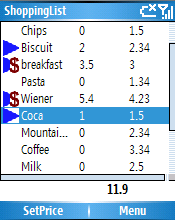
ShoppingList1With Shopping List you can create a list of items you need to buy. You then go to your favorite grocery store, as you take your items from the shelves you check these items on your cell. The great thing is that you need a single hand to do that. Therefore you have one hand free to pick up your stuff. You can even enter the actual price of the items. You will be warned if any of these items is more expensive that a potential maximum price you might have set before hand. The actual price of your basket is computed during your shopping as well.

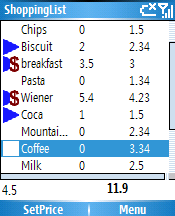
ShoppingList1_priceYou may also disable the price feature, either because you don't care how much stuff cost or because you are using Shopping List to track other kind of list of items.


Technologies

The current version of Shopping List targets the .Net compact Framework 1.1 (a possible new version would target the .Net compact framework 2.0) to ensure a maximum compatibility. Therefore it should run smoothly on any Smartphone running Smartphone 2003 to Windows Mobile 6.

Installation

  • extract the .zip file on your computer
  • copy the resulting folder wherever you want on your smartphone (it's in the root of my storage card on mine)

Usage

To use shopping list you need to launch if first (obviously) and then either:

  • Open an existing list (one is provided for example, it is named export.xml and bundled with the app) with MENU/FILE/LOAD.
  • Otherwise just start adding item with the MENU/ADD command.

As you will see you can delete/add/edit all the items even if the file was created on your computer.  

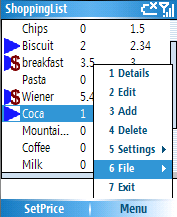
ShoppingList1_menuYou can save by using the MENU/FILE command.

Once you are in the store just change the item selected with UP/DOWN. Press the validate key (probably the biggest one on your keypad) to check the item. If you had entered a price beforehand (number on keypad)

License

You can use and distribute this software freely. If you want to get the sources, just drop me a line and I might send you those with a specific license (maybe GPL, I still got to think about that)

Future

I got tons of idea for a new version. The main improvement would be to specifically target the .Net compact framework 2.0. It would of course disrupt compatibility with older platforms but it would also allow for a better integrated application and easier programming for me.

Questions, bugs

If you have any questions, remarks or noticed a bug, you can drop me a line at info [ at ] jonathanroussel.com (replace the [ at ] with the At sign).

Download

Finally, you can download the zip file here

Friday, April 13, 2007

Disabling the ASP.Net ?WSDL command

When designing Web Services with the Microsoft ASP .Net technology the automatically generated WSDL file is accessible by adding the “?WSDL” command to the ASMX file URI. e.g : http://www.webservicemart.com/phone3t.asmx?WSDL

You might want to hide this wsdl file for a number of reasons:

  • To deploy a hand-written WSDL file and be sure that no one uses the automatically generated WSDL.
  • To hide the WSDL and thus limiting access to the people you have given a version of the WSDL file to. Therefore ensuring a very basic protection of sensitive data exposed by the Web Services.

Whatever your motivation is, several solutions are available to you. The easiest one is to add these lines in the web.config file :

<system.web>

<webServices>

<protocols>

<removename="Documentation"/>

</protocols>

</webServices>

</system.web>

By using this solution, the HTML documentation available when accessing a wsdl page (e.g : http://terraservice.net/TerraService.asmx) will no longer be accessible, same for the “?WSDL” command result. And this for every ASMX pages presents in the project.

If you want more control (hiding only some ASMX pages, hiding only “?WSDL” but not regular documentation, modifying HTML documentation, …) you might want to consult this article.

Wednesday, April 04, 2007

SOAP Headers supports

It's been a long time since I last posted a technical post. This post will deal with how the current Web Services framework deals with soap headers. More specifically, how does the .Net framework and Glassfish JAX-WS RI (J2EE ->JEE Reference Implementation) deals with those.

As it deals with a new subject in this blog (Web Services), let me first speak about the background before dwelling in the real subject.

Background

Today most Web Services uses the WSDL, UDDI and SOAP over HTTP protocols to work. WSDL is a xml based language to describe what a web services supports, SOAP is an xml based protocol designed to exchange messages, if possible compliant with the WSDL contract.

SOAP messages are composed of a body and header. The W3C recommended use is: data (payload) in the body and metadata (authentication, session ...) in the header.

Defining Soap header

IBM published a very interesting resource on how to define soap headers in the WSDL contracts. To put in a nutshell, there is two ways to define soap headers: either explicit or implicit.

Explicit, the headers are considered to be part of the input message of operations. The difference is made in the binding.

Implicit, the headers are defined in separate messages and are defined to be input of operations in the binding.

Current framework support

I have recently noticed that the support of both WSDL constructions greatly differ between the .Net and JEE RI frameworks.

I have defined two WSDL files, one with explicit soap headers, and the other with implicit header. I used the .Net framework wsdl.exe tool to create both client and server source stub/interface and I used the wsimport.exe tool (JEE RI) to do the same for the java platform.

While the .Net framework can handle both explicit and implicit construction, the JEE RI doesn’t add the headers when the WSDL defines implicitly the headers. Therefore, one has to manually add the headers parameters to every function.

A possible fix

If JEE RI doesn't support implicit construction, a possible fix would be to always add explicit headers.

Saddly, the .Net framework generated WSDL files defines implicit headers. Thus JEE RI won't be able to automatically consume .Net WSDL files.

My Conclusion

Despite all the works on both sides to improve JEE/.Net interoperability (WSIT, project Tango), and despite the WS-I work; consuming Web Services endpoints created in a language in the one might still be problematic when using soap headers.

Tuesday, April 03, 2007

Agile before it's time

Nowadays, more and more people seems interested in Agile and XP.

The basic idea is to split projects into a bunch a little projects with very short deadlines. Agile commonly emphasizes the downsizing of documentations (User Requirements, Functionnal specifications) and advocate more feedbacks from the final users/buyers. [From I got of a DotNetRocks podcast, you might want to read the transcript or listen to to the full podcast. Really interesting]

I recently found an intersting ressource, Jack W.Reeves talking about software development in the early 90s and already introducing some Agile concept before it even got a name. You will find this very interesting discussion at :

http://www.developerdotstar.com/mag/articles/reeves_design.html